Guild Config - Reviving Module
The Reviving Module is a module designed to be used by a faction or faction family to set up their own Revive Contracting business.
This module has a lot more setup that is outside the config. For detailed usage, commands, and examples, see the Reviving Module Overview.
Settings at a glance
| Setting | Default | Summary |
|---|---|---|
| Non-Contract Requests Channel | null |
The text channel where non-contract revive requests are sent |
| Non-Contract Requests Role | null |
The role pinged with non-contract revive requests |
| Contract Requests Channel | null |
The text channel where contract revive requests are sent |
| Contract Requests Role | null |
The role pinged with contract revive requests |
| TT Requests Channel | null |
The text channel where torn-tools revive requests are sent |
| TT Requests Role | null |
The role pinged with torn-tools revive requests |
| Request Confirmations | Enabled |
When enabled, the buttons on revive requests require a second click |
| Detailed Requests | Enabled |
When enabled, revive requests have much more details about the target |
| Preset Embed | Preview Unavailable |
The text channel where logs for all revives for all registered factions are sent |
Non-Contract Request Channel
Purpose
The non-contract request channel is the text channel in which revive requests are sent for factions without an active contract.
Accepts
Text Channel
Default
null
Non-Contract Request Role
Purpose
The non-contract request role is the role which is pinged with non-contract revive requests.
Accepts
Role
Default
null
Contract Request Channel
Purpose
The contract request channel is the text channel in which revive requests are sent for factions with an active contract.
Accepts
Text Channel
Default
null
Contract Request Role
Purpose
The contract request role is the role pinged with contract revive requests.
Accepts
Role
Default
null
TT Request Channel
Purpose
The tt request channel is the text channel in which revive requests that were submitted using TornTools are sent.
The contract request channel will take priority over the TornTools request channel.
Accepts
Text Channel
Default
null
TT Request Role
Purpose
The tt request role is the role pinged with revive requests that were submitted using TornTools.
The contract request role will take priority over the TornTools request role.
Accepts
Role
Default
null
Request Confirmations
Purpose
The request confirmations is a toggle which controls whether a written confirmation is required to confirm the manual completion of a revive request:
| State | Behaviour |
|---|---|
| Enabled | Requests will require a written confirmation to manually complete requests |
| Disabled | Requests will will be completed immediately upon clicking a manual complete button |
Accepts
Enabled | Disabled
Default
Disabled
Detailed Requests
Purpose
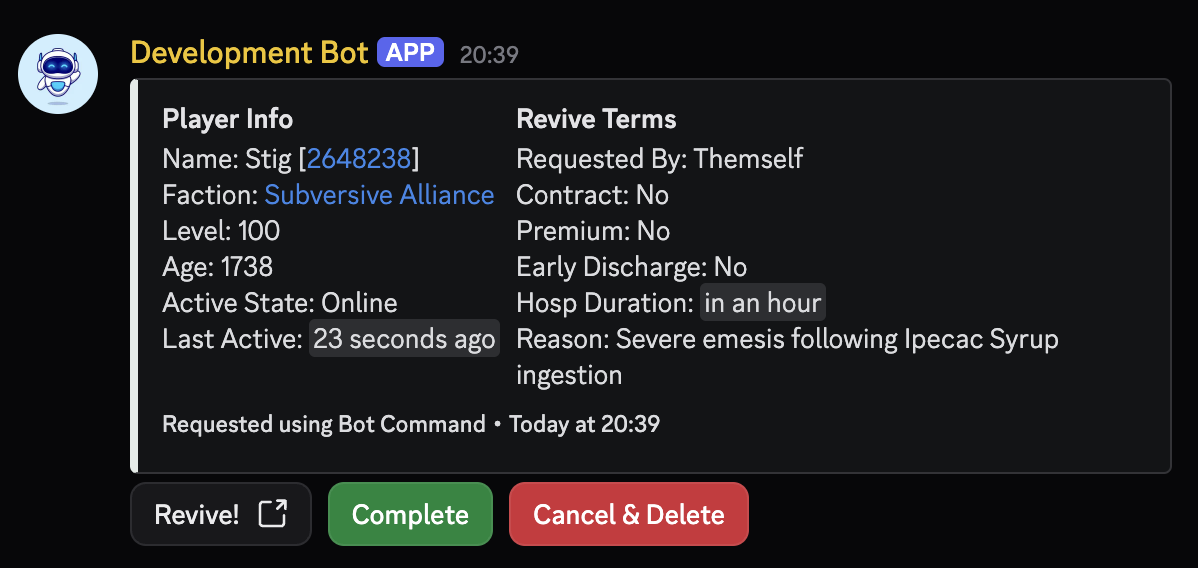
Detailed requests is a toggle which controls whether revive requests contain information about the target.
Accepts
Enabled | Disabled
Default
Enabled
Preset Embed
Purpose
The preset embed is a JSON object which represents a Discord Embed. The preset embed is used for /revive panel
You can design your own embed and export the JSON here: Embed Generator
Click to expand to see the Preset Embed (Default)
Accepts
Discord Embed JSON
Default
Default JSON Code
{
    "footer": {
        "text": "\ud83d\udcb0 Pay your reviver $1.8m or 2 Xanax for their services!"
    },
    "thumbnail": {
        "url": "https://cdn.discordapp.com/icons/850095302349553674/e32db2a73b7abe6370ba573da5743f5c.png?size=160&quality=lossless",
        "proxy_url": "https://images-ext-1.discordapp.net/external/5KNwIInxZfbG5dknhnrie1IFLMgnyb9xbpJb68m1ooM/%3Fsize%3D160%26quality%3Dlossless/https/cdn.discordapp.com/icons/850095302349553674/e32db2a73b7abe6370ba573da5743f5c.png",
        "width": 160,
        "height": 160,
        "content_type": "image/png",
        "placeholder": "TtgFBwJ1OmiUeXeIddtGCMl2rM/nBYMB",
        "placeholder_version": 1,
        "flags": 0
    },
    "author": {
        "name": "Stig's Revive Services",
        "icon_url": "https://cdn.discordapp.com/avatars/439327545557778433/a_09b7d5d0f8ecbd826fe3f7b15ee2fb93.gif?size=128",
        "proxy_icon_url": "https://images-ext-1.discordapp.net/external/prxF1aB3xEK4zq1uf4jY_UGO8sTt1_mGdYiTxqnDQbI/%3Fsize%3D128/https/cdn.discordapp.com/avatars/439327545557778433/a_09b7d5d0f8ecbd826fe3f7b15ee2fb93.gif"
    },
    "flags": 0,
    "color": 15002600,
    "type": "rich",
    "description": "\ud83d\ude80 Use the buttons to request a revive from Stig's Reviving Services!\n\n\ud83d\udc89 Alternatively, you can use /r to request a revive for yourself, or someone else",
    "url": "https://discord.gg/VFc533sx5F",
    "title": "Visit our Discord Server"
}