Guild Config - Verification Module
The Verification Module is designed to link torn players to discord accounts. If successful, the module can automatically sync nicknames and discord roles.
For detailed usage, commands, and examples, see the Verification Module Overview.
Warning
This module is often configured incorrectly, please pay attention to any warning fields for more information.
Settings at a glance
| Setting | Default | Summary |
|---|---|---|
| Verification Roles | null |
Leads to a sub-menu to configure verification roles |
| Role Override Role | null |
A role assigned members to prevent their roles being synced |
| Nickname Sync | Username [ID] |
The format for synced nicknames to adopt |
| Nickname Override Role | null |
A role assigned members to prevent their nickname being synced |
| Welcome Channel | null |
The text channel that welcome messages for new members are sent |
| Welcome Message | Welcome {user} to {guild_name} |
The message included in the welcome message description |
Verification Roles
Purpose
Verification roles is a sub-menu that allows in which roles can be configured to be assigned to:
- All Guild Members
- All Faction Members
- Faction Members in Specified Positions
Warning
Please ensure to read the footer of the embed messages. This will help you understand who the roles will be given to.
Click to expand for instructions on setup
In the screenshot below, you should only add roles you want every verified member to receive. This section gives roles regardless of Faction
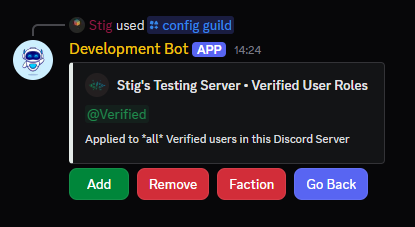
In the screenshot below, you can access the faction roles menu by using the red Faction button (See above), and then input the Faction ID.
You can then add roles which will be given to All Members of the Faction ID you specified.
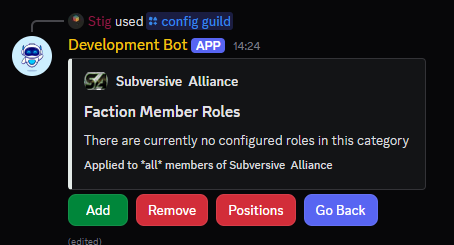
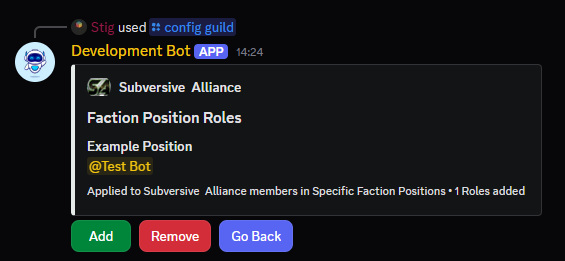
In the screenshot below, you can access the faction positions menu by using the red Positions button (See above)
You can then add Positions which match those in your Faction and assign roles to those positions.
Anyone in these positions in Torn, will get the positions in discord.
Warning
Position names are case sensitive, and must be spelled exactly as they are on Torn.
Accepts
Role
Default
null
Role Override Role
Purpose
The role override role is the role which allows members to bypass the automated role removal function.
Accepts
Role
Default
null
Nickname Sync
Purpose
Nickname sync is the setting which controls the behavior and format for applying nicknames, see the table below:
| State | Behaviour |
|---|---|
| Disabled | Nicknames will not be synced |
| Username Only | Nicknames will be synced to Torn Username |
| Username [ID] | Nicknames will be synced to Torn_Username [ID] |
| [FacTag] Username | Nicknames will be synced to FacTag Torn_Username |
| [FacTag] Username [ID] | Nicknames will be synced to FacTag Torn_Username [ID] |
| Username [ID] [FacTag] | Nicknames will be synced to Torn_Username [ID] FacTag |
Accepts
Nickname Format
Default
Username [ID]
Nickname Override Role
Purpose
The nickname override role is a role that can be given to discord members to prevent the Nickname Sync from automatically updating their nickname.
Accepts
Role
Default
null
Welcome Channel
Purpose
The welcome channel is the text channel where a welcome message for new server members is sent.
This message will include their verified state, and instructions on how to verify if it was not automatic.
Accepts
Text Channel
Default
null
Welcome Message
Purpose
The welcome message is the message sent to the welcome channel when a new member joins the server.
The welcome message has basic dynamic formatters:
| Formatter | Behaviour |
|---|---|
| {user} | Is replaced with the new members @Username |
| {guild_name} | Is replaced with the discord server name |
Info
More of these can be added on request, join [Stigs Dev Server][https://discord.gg/VFc533sx5F] and post a suggestion here.
Accepts
String
Default
Welcome {user} to {guild_name}