Introduction to Discord Interactions
All of my Discord bots are built and designed around Discord’s interaction system using Discord.py.
These bots are built to be efficient and user-friendly. I make extensive use of Discord features such as Buttons, Dropdowns, and Modals to create a clean, guided experience - without the need for messy text commands or prefixes.
Slash Commands
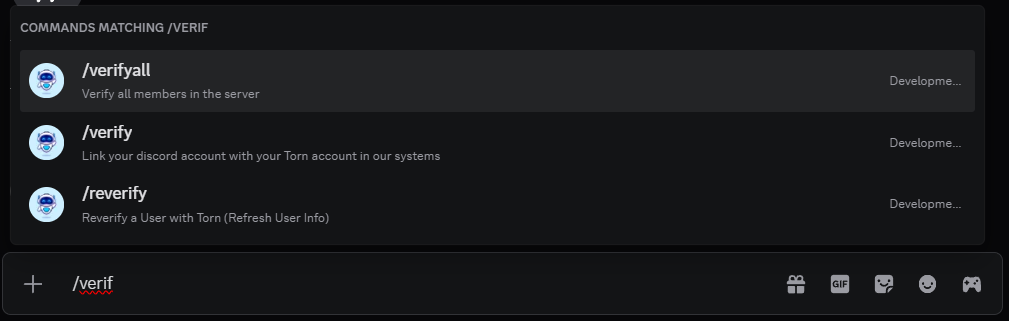
All commands are executed using a slash (/) followed by the command name - for example: /verify.
When you start typing a slash command, Discord’s built-in menu will automatically suggest available commands and parameters.
This makes it easy to find commands without needing to memorise syntax or full command names.
Optional and Required Arguments
If you hover over a command, you’ll see labels such as | +1 optional, which indicate optional parameters.
Parameters shown by name (for example, user) are required.
Every bot also includes a /help command, which provides a list of commands per module along with a short description of their functions.
Interaction Failed
- If you see this message, first check whether your bot is online.
- If it is, visit Discord Status to check for platform issues.
- If no issues are listed, please contact Stig.
Buttons
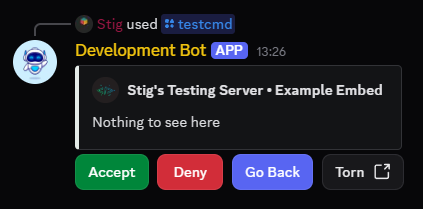
Many commands will display a button-based menu.
A few useful things to know:
- Menus expire 15 minutes after being opened.
- Menus are always locked to the user who opened them.
Select Menus
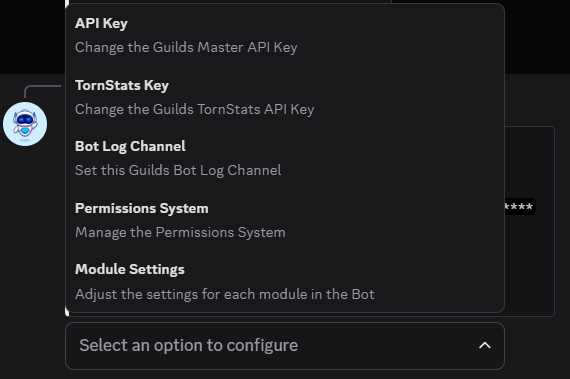
Whenever a selection is required, it will usually appear as a dropdown menu, like the example below.
Here are a few tips:
- Select menus that appear from a button expire after 3 minutes.
- Menus are always locked to the user who opened them.
- Some menus allow you to select multiple items at once.
- You can type into Role, User, and Channel select menus to search more easily.
Modals
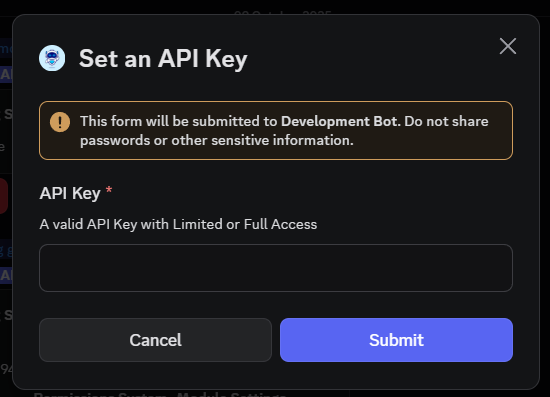
Modals are pop-up forms used when user input is required - for example, when entering an API Key.
Tip
For the best experience, make sure your Discord client is up to date.
My bots rely on modern interaction features that may not display correctly in older versions.